Skip to content
Kinesis

Changelog · 2026

What we shipped in 2026.

The customer-facing features and improvements we released each month, from January to November, most important first.

Releases
78
Months
11
  1. November 2026So far

    01

    An AI Debugger That Reads Your Code

    Debug with AI can now read your app's GitHub repository at the exact commit that failed to build or is running now, and it shows each file it reads. It finds the cause of a broken build in your Dockerfile, package files or config instead of asking you to paste them. Fixing a failed deploy takes one chat, and only people who can edit the app get repository access.
  2. October 2026

    AAcme IncProjects · Apps · Grids · BillingMembers+ Invite memberAalice@acme.devAdminOwnerBbob@acme.devDeveloperCcarol@acme.devDeveloperDdave@acme.devViewerGridsResearchresearch-gpuProductproduct-inferenceOne view of every division

    01

    Organizations

    Team accounts are here: projects, apps, Grids, servers and billing belong to your organization, with members, roles, invitations and an audit log. Each division can run its own Grids while IT keeps one view of everything. Onboarding and offboarding take seconds.

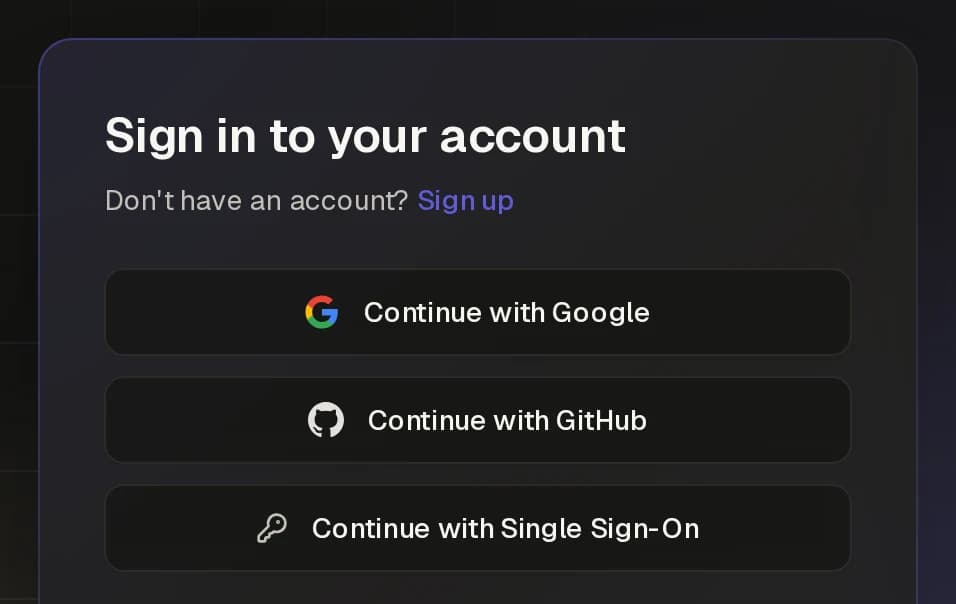
    The portal sign-in card with Continue with Single Sign-On

    02

    Enterprise Single Sign-On

    Organizations can turn on SSO with their identity provider, verify their domains and require SSO for every member. Your team signs in the way it already does at work. Access is controlled centrally and removed automatically when someone leaves.

    Undo a bad release without rebuildingDeploymentsStatusSourceStartedSucceededDeploy failedAdd response cachee4c91a7 main5 min agoSucceededTune batch sizeb7e21d4 main2 h agoRoll backSucceededAdd chat endpointa1f3c9e mainyesterdayRoll backBack on b7e21d4Same image, redeployed instantlyNo rebuildActive

    03

    One-Click Rollback

    Roll a GitHub-deployed app back to any earlier build instantly, without rebuilding. A bad release is undone in seconds. Ship faster, because mistakes are cheap to fix.

    GRIDml-researchLimits apply live to running appsPoliciesQuotas2 GPUs per person · 15 min graceOnContainer limits4 CPU cores, 16 GiB memory per containerOnGPU idle reclaimEvict after 30 min idle · 10 min warningOnFair share2 h turns · 1 app per personOn

    04

    Grid Policy Controls

    A redesigned Grid page shows every policy at a glance: GPU limits, grace periods, per-container caps, idle reclaim and fair share. Limits are applied live to running containers. Owners set the rules once, and Kinesis enforces them.

    05

    Grids That Follow Your Apps

    Launch an app on a Grid before its machines arrive, and it starts as soon as machines that fit it join. Spot machines are leased only while a running app needs them, and a new "Apps on this grid" view shows which apps fit which machines. Owners stop paying for GPUs no app uses, and teams are never stuck behind a hard block.

    06

    See Who Uses What

    Redesigned Servers and Grids pages show each machine's hardware, live CPU and GPU usage, whose apps run on it and who added it, with a summary of the whole fleet on top. Both pages load in milliseconds, even for large fleets, and keep a full audit trail. IT gets clear visibility across the whole organization, and capacity planning and cost conversations start from facts.

    07

    Scale to 10,000 Replicas, Safely

    Apps can now run up to 10,000 replicas, up from 20, for large batch jobs and high-traffic services. A new spread group keeps apps with the same group name on different machines, so one machine going down never takes out every copy of a database or cache. Teams scale out without giving up resilience.

    08

    Smoother App Updates

    Updates now pull the new image before they stop the old container, and each app can set its own shutdown grace period. The Deployments tab shows a new build as Deploying until your servers really run it, so Active always means live. Updates cause less downtime, and teams always know which build is serving.

    09

    Pay Only When Rented Machines Are Up

    Spot machines leased from the marketplace no longer bill for the time they are offline. When a leased machine goes dark, the Grid lets it go and leases a fresh one, so apps keep running. Customers pay only for compute they can actually use.

    10

    Hardened Security Across the Platform

    Every internal API call now checks the caller's role, servers verify the control plane's identity before they connect, and machine keys are created on the machine itself. These changes close whole classes of attack before anyone can try them. Customers get stronger protection without changing anything.

  3. September 2026

    Terminal$ export KINESIS_API_KEY=kn_7Hq2xK9p…$ curl -X POST \https://api.kinesis.network/v1/projects/$PROJECT/apps/$APP/start \-H "Authorization: Bearer $KINESIS_API_KEY"202 Accepted{ "id": "66f2a9c4…", "targetState": "running" }API KEYci-deploykn_7Hq2xK9p…1 project · 2 permissionsapps:writecompute:spendDOCUMENTEDOpenAPI 3.1 specapi.kinesis.network/openapi.jsonAppsGridsServers

    01

    Public REST API and API Keys

    Everything you do in the portal can now be automated through a documented REST API (OpenAPI spec included) with secure API keys. Plug Kinesis into your CI/CD, internal tools and scripts. Infrastructure as code, without the infrastructure.

    AI assistantmcp.kinesis.networkDeploy vLLM on my ml-research Grid, 1 GPUAIcreate_appKinesis toolname: "llm-chat"image: "vllm/vllm-openai"gpuCount: 1get_app_statusrunningDone. llm-chat is live on ml-research.GRIDml-researchgpu-node-1llm-chat1 GPUgpu-node-3

    02

    Let AI Agents Deploy for You (MCP)

    Kinesis now has an MCP server with secure OAuth sign-in, so AI assistants and agents can deploy and manage your apps, Grids and builds. Ask your assistant to ship a model, and it does. This is the shortest path from idea to running AI app.

    GRIDml-researchLimit GPUs per person4alice@acme.dev2 of 4 GPUsbob@acme.dev4 of 4 GPUs+1carol@acme.dev1 of 4 GPUsCan't start — grid GPU quota reachedYour quota on ml-research: 4 of 4 GPUs used.The app waits until room frees up.

    03

    Per-User Quotas on Shared Grids

    Grid owners can cap how many apps, instances and GPUs each user can take. Users see clear notices when they hit a limit. Shared capacity stays fair and predictable for every team.

    HOME OR OFFICElab-serverFirewall / NATInbound stays closedOutbound tunnelApp trafficKinesisRemote ReachYour usersNo inbound port forwarding needed

    04

    Connect Any Machine, Behind Any Firewall

    Adding a server now starts with where it is connected, and recommends the right method, including Kinesis Remote Reach for machines behind a firewall or NAT. You don't need to open inbound ports. Office PCs, labs and on-prem servers join in minutes, securely.

    05

    Built-In Runtime Security

    Cloud servers now run a security monitor by default that detects suspicious container activity, stops it and reports it to you. Threats get caught as they happen, not after the damage. Peace of mind comes standard.

    06

    Ready-Made App Templates

    Start a new app from a template that already has the right image, ports and resources. Common workloads go live without reading any docs. New users reach their first running app faster.

    07

    Know Why an App Isn't Running

    App, server and log pages now show placement checks, work orders and Grid state in one place. When an app waits for a machine, you see exactly which rule holds it back. Problems that used to need a support ticket now take a glance.

    08

    Turn Windows PCs into Grid Capacity

    Spark, the Kinesis desktop app for Windows, now links a PC to your account in a few clicks and lets you pause it or set a schedule. Office and lab PCs add compute during the hours they would sit idle. Owners stay in control of when their machine works.

    09

    Secrets Stay Secret

    Kinesis now flags environment variables that look like secrets and hides their values across listings and APIs. Passwords and API keys don't leak through screenshots or shared screens. Security best practice becomes the default.

    10

    More GPUs on the Marketplace

    Spot instances now include GeForce RTX 20-series and newer cards and workstation RTX GPUs, named by their full model. Customers get more choice at more price points. Smaller workloads find affordable hardware that fits.

  4. August 2026

    Redeploy the app. The data stays.my-appv1ReplacedRedeploymy-appv2Runningsame volumesPersistent Storageup to 4 per appNameMount PathSizemodels/models200 GBdata keptdb/var/lib/postgresql50 GBdata keptuploads/data/uploads20 GBdata kept

    01

    Persistent Volumes

    Grid apps can now keep up to 4 persistent storage volumes that survive restarts and redeploys. Databases, model caches and user uploads stay safe. Stateful workloads now run on Kinesis as easily as stateless ones.

    One GPU, seven isolated slicesGPU LayoutGPU 0 — A100 80GB80 GB VRAMMIGMax countHalvesMixedCompute 7/7 · Memory 7/81g.10gb#0chat1g.10gb#1embed1g.10gb#2ocr1g.10gb#3rerank1g.10gb#4whisper1g.10gb#5vision1g.10gb#6notebookEach app gets its own slice of compute and memory

    02

    GPU Slicing with MIG

    Split data-center GPUs (A100 and H100 class) into isolated slices with a visual layout designer, and give each app its own slice. One powerful GPU can now serve many smaller workloads safely. Do more with less hardware.

    Idle GPUs go back to apps that need themGPU 0 usagenotebook-atrain-bidle threshold!WarnedReclaimedIdle windowGrace periodnotebook-aIdle on GPUmoved off this GridGPU 0train-bRunningwas waiting for a GPU

    03

    GPU Idle Reclaim

    Grids can now reclaim GPUs from apps that sit idle, with configurable thresholds and a clear warning before anything is stopped. Scarce GPUs go back to the people who are actively using them. Every GPU you pay for does real work.

    When the Grid is full, users take turnsArrival orderFair-share queueAUser Aapp-1AUser Aapp-2AUser Aapp-3BUser Bapp-1CUser Capp-1AUser Aapp-11BUser Bapp-12CUser Capp-13AUser Aapp-24AUser Aapp-35GridFullnext free machine2 h turns · 1 app per person

    04

    Fair-Share Scheduling

    When a Grid is full, apps now wait in a fair queue and take turns instead of first-come-first-served. No single user can hog shared capacity. Every team gets its share, automatically.

    05

    Grid Admin Superpowers

    Share Grids with Editor and User roles, see live CPU, RAM, GPU and VRAM use for every app, and stop or restart apps from one screen. Grid owners get full visibility and control over shared capacity. IT stays in charge without getting in the way.

    06

    Wake-Ups That Wait for Stock

    If a GPU is out of stock when a hibernated machine wakes, Kinesis keeps trying and shows you the status, and owners get an alert if a machine fails to hibernate. Nothing gets stuck silently. You can trust hibernation to save money without risking your capacity.

    07

    A Grid-Aware App Gallery

    The App Gallery now deploys to your Grid by default when you have one. Models and apps land on the hardware you already pay for, with no extra setup. Getting value from your own compute takes one click.

  5. July 2026

    Your machinesBYOC · no added costDedicated InstancesAWS · Azure · KinesisSpot InstancesKinesis marketplaceGRIDml-research8 onlinegpu-box-1gpu-box-2train-1train-2train-3spot-1spot-2spot-3

    01

    Grids and Spot Instances

    Grids now combine your own machines, on-demand cloud machines and rented Spot Instances from the Kinesis marketplace in one pool. Grow and shrink compute in minutes, at the price that fits each workload. One platform, one view, for every kind of compute you use.

    SSH keys+ Add keyMy laptopSHA256:q3Fv8tXbW2…9kXwAdded Jul 8 · assigned to 3 serversgpu-box-1train-1train-2CI runnerSHA256:Lm4cR0aZp7…Qe1dAdded Jul 14 · assigned to 1 servertrain-1Terminal$ ssh -i ~/.ssh/id_ed25519ubuntu@203.0.113.24Welcome to Ubuntu 24.04 LTSLast login: Tue Jul 15ubuntu@train-1:~$

    02

    Bring Your Own SSH Keys

    Upload your SSH keys once and assign them to your cloud and BYOC machines for direct access. Engineers get into their machines with the tools they already use. Your keys, your control.

    Appllm-serveGrid priority1ml-research2burst-poolGRIDml-researchPrioritize machines1gpu-box-1Preferredllm-serve2gpu-box-2Normal3spot-1Backup onlyOverflowGRIDburst-pool

    03

    Put Workloads Exactly Where You Want

    Rank machines by priority inside a Grid, and let one app run across several Grids. Your preferred hardware takes the work first, and the rest of the fleet is there for overflow. Smarter placement means better performance and lower cost.

    04

    Multiple Domains per App

    One app can now serve several custom domains, including root (apex) domains like yourcompany.com. Run regional sites, brand variants or migrations from a single deployment. Every domain gets automatic SSL.

    05

    Provider Hub: Earn from Your Hardware

    Approved suppliers can list whole machines on the Kinesis marketplace and track their earnings in the new Provider Hub. Hardware that would sit unused now pays for itself. More supply on the network also means more choice for everyone who rents.

    06

    A100 GPUs on Demand

    A100 data-center GPUs can now be provisioned straight from the Grids page. Large training and inference jobs get top-tier hardware in minutes, without a long-term contract. You scale up for the big job and give it back when you are done.

    07

    Shared Grids Without Billing Friction

    Apps that run on a Grid shared with you now use that Grid's machines without extra per-use charges or balance checks. The Grid owner pays for the capacity once, and every team uses it freely. Sharing compute inside a company is finally as simple as sharing a folder.

  6. June 2026

    Build Failed> npm cinpm ERR! code EUSAGEnpm ERR! missingpackage-lock.jsonDebug with AIKinesis AIBetaFailed build logs for my-apiWhy did my build fail?npm ci needs package-lock.json, but theDockerfile only copies package.json.Suggested configuration changes- COPY package.json ./+ COPY package*.json ./ RUN npm ciApply app changes

    01

    Kinesis AI, Your Built-In DevOps Assistant

    An AI assistant now lives in the portal. It can read your build failures and app logs, explain what went wrong and suggest Dockerfile fixes. Help is instant, in context, and available around the clock, with no ticket queue.

    ProvisioningKINESIS · 1x A100QueuingConfiguring systemFinishing upRegistering serverCould not reach capacityAttempt 3 of 3We weren't able to acquire a server.Retry now, or try a different region.RetryDismiss

    02

    Clear Provisioning, Start to Finish

    Machines being provisioned now show live progress, instance details, and Retry or Dismiss options if something fails. You always know what is happening and what to do next. No more guessing whether capacity is coming.

    APP STATEDownloadingStartingRunningStart BlockedCan't start — no suitable nodeNo node currently meets this app's requirements.gpu-box-1— not enough GPU memoryedge-node-2— not enough GPUs

    03

    Clearer App States

    Apps now show precise states as they change, including a new "Start Blocked" state that explains why an app can't start. Small changes to a running app no longer get blocked for no reason. Less confusion, faster fixes.

    04

    Fast Local SSD Storage, No Extra Charge

    Cloud machines can now use fast local SSD for images and containers, and built-in instance storage is no longer billed separately. Big models load faster and costs go down. Better performance for less money.

    05

    "Never Hibernate" for Critical Machines

    Pin any machine so it never hibernates automatically. Always-on services stay ready, while the rest of your fleet keeps saving money. You get both savings and reliability, machine by machine.

    06

    A Self-Healing Traffic Layer

    Traffic to your apps now runs through a rebuilt App Proxy layer that checks its own health and repairs routes and certificates automatically. Your endpoints stay up even when part of the network has a bad day. Reliability improves without any change on your side.

    07

    Manage Large Fleets with Ease

    A new list view for Grids and servers adds search, pagination and a per-app view. Teams with hundreds of machines find the one they need in seconds. The portal scales with your fleet.

  7. May 2026

    Share projectChoose who can open ml-research.dana@acme.devDeveloperSend invitationADDEDBbob@acme.devDeveloperCcarol@acme.devViewer1alice@acme.devadded you to project"ml-research"In the app and by email

    01

    Share Projects and Apps with Your Team

    Invite collaborators to any project or app with the right role, and keep everyone up to date with in-app and email notifications. Teams work together in one place instead of sharing logins. Access is clear, and you can remove it at any time.

    Two-factor authenticationEnter the 6-digit code from yourauthenticator app.48291Remember this browser for 30 daysVerifyORUse a passkeyTouch ID, Windows Helloor a security keyUse a backup code••••-••••••••-••••••••-••••••••-••••

    02

    Two-Factor Authentication and Passkeys

    Protect your account with an authenticator app or a passkey/security key, with backup codes and trusted devices. This keeps your workloads and billing safe even if a password leaks. It is enterprise-grade security that takes seconds to turn on.

    SourceGitHubDockerHubDocker LinkUploadTARmy-model.tarUploading... 64%docker save -o my-model.tar my-modelUpload completemy-model.tarCreate AppRunningNo registry needed

    03

    Deploy by Upload

    Upload a Docker image file straight to Kinesis and deploy it. No registry needed. Air-gapped builds, private models and teams without a registry can now ship with one upload.

    04

    One-Token Server Onboarding

    Bring your own compute with a single install command and a personal token that you can regenerate at any time. Adding a server takes a minute, and access stays under your control. Scaling from one machine to a hundred is as simple as running one command.

    05

    Full Activity History

    Every project and app now has an activity trail that shows who changed what, and when. Teams can trace any change in seconds. Audits and post-mortems become simple.

    06

    Enterprise-Ready Billing

    Pay by card, wire or ACH, get invoices that list every machine, and download all your charges and credits as CSV. Finance teams get the documents they need without asking support. Kinesis now fits the way larger companies buy.

    07

    Logs from Every Instance, Side by Side

    Stream logs from several instances of an app at once, in tabs you arrange yourself. Problems that only show up on one machine are easy to spot. Debugging scaled-out apps no longer means jumping between pages.

  8. April 2026

    Add Servers1× H100 80GBGPU · 26 vCPUsHIGH DEMAND1× A100 80GBGPU · 28 vCPUs1× L40S 48GBGPU · 16 vCPUsJoin Queue for Available InstanceTHENIn the queueNo refreshingAcquiredautomaticallyEmail whenit's ready

    01

    Live Stock and Order-Ahead

    See live GPU and CPU availability before you provision, with "high demand" labels. When a machine is out of stock, you can order it anyway, and Kinesis gets it for you as soon as it is free. No more refreshing pages to catch an open GPU.

    my-appSourceRuntimeNetworkExecutionResourcesExecution ModelServiceAPIs, inferenceendpointsTasksRun untilcompletionScheduledFixed scheduleComing SoonResourcesComputeNew gridUse an existing gridServerless

    02

    A Simpler Way to Configure Apps

    App setup now has clear Execution and Compute strategy tabs with card-style choices. You describe how your app should run, and Kinesis handles the hardware details. New users get to a working deploy faster, and experts still get full control.

    RUNWAY≈ 12 daysof runtime left on your balanceEmailProtecttoday48h2hLow balance protectionHibernate threshold2 hoursAbout 48h of runtime lefton your balanceAgain at 24h, 12h and 1h,before your balance runs out

    03

    Prepaid Runway and Node Protection

    See how long your balance will keep your machines running, protect critical machines from automatic shutdown, and get email warnings early. No surprise outages because a balance ran low. Planning ahead becomes easy.

    04

    Self-Healing Machines

    Machines that hit a critical failure now reboot and recover on their own, and you can replace a faulty machine with a fresh one in one click. Your apps spend less time down, and your team spends less time on support. Reliability without babysitting.

    05

    Full Control of Your Logs

    Choose how long logs are kept, download or delete them, browse history, and view a machine's system logs from the portal. Debugging takes minutes instead of SSH sessions. You decide how much data you keep, for cost and for compliance.

    06

    The Newest Open Models, Ready to Run

    The App Gallery added the latest open models, including Gemma 4, Qwen 3.5 and Qwen 3.6. Teams try new models the week they come out, with one click. Staying current with open-source AI takes no extra engineering.

    07

    Private Registries Made Easy

    Deploy from private Docker registries with credentials that Kinesis checks before it saves your changes. A wrong password shows up in the form, not as a broken app. Private images become as easy to ship as public ones.

  9. March 2026

    Dedicated ComputeCloud providerAWSAzureKinesisGPUCPUInstance typeg5.xlarge1× A10G GPURegionUS East (N. Virginia)Gridml-researchYour machineBYOCYour machineBYOCg5.xlargeAWSJoinedYour machines + cloud, one Grid

    01

    Launch Cloud Machines from the Portal

    Grids now provision AWS, Azure and Kinesis cloud machines on demand, straight from the portal, with GPU and CPU options side by side. No separate cloud accounts or consoles to manage. Your own hardware and on-demand cloud capacity live in one place.

    https://app.yourcompany.comYYourCompanyDNS verifiedRecord foundCertificate issuedSSL handled for youAuto-renewsNo expiry surprises

    02

    Your Domain, Automatic SSL

    Attach your own domain to any app, and Kinesis issues and manages the SSL certificate for you. Your users see your brand, not ours. No certificate chores, ever.

    Buy GPUs once, share them with every teamIT adminOwnerBuys capacity onceGridgpu-gridGPU 1ABGPU 2CAGPU 3BGPU 4CBTeam AShared · runs appsTeam BShared · runs appsTeam CShared · runs apps

    03

    Shared Grids

    Grid owners can now share their machines with other users and teams. An IT admin can buy capacity once and give every team access to it. Expensive GPUs get used by everyone who needs them, not locked to one account.

    04

    Hibernate, Wake and Reboot on Your Terms

    Put machines to sleep, wake them up or reboot them with one click, with clear status at every step. You decide when to save money and when to have capacity ready. Simple controls keep you in charge without SSH or scripts.

    05

    One Bill for All Your Compute

    Dedicated machines now show their price up front, roll into a fleet cost overview and appear on the same invoices as everything else. Finance teams see one clear bill instead of several. You always know what your fleet costs before the invoice arrives.

    06

    Never Run a Stale Image

    Kinesis now notices when a Docker tag points to a new image and offers to pull the latest version. You always know whether your app runs the code you just pushed. No more redeploys that quietly keep the old build.

    07

    Smarter Container Setup

    The app form now suggests ports from your image, lets you override its entrypoint and set shared memory, and keeps shell-based images running. Images that used to need a custom wrapper now run as they are. More of the software you already have deploys on the first try.

    08

    Choose Your Disk Size

    Pick the storage size for every cloud machine you provision, on AWS, Azure and Kinesis cloud. Big models and datasets fit without workarounds. You pay for the disk you need, not a fixed default.

  10. February 2026

    01git push02Build03Livemaina1f3c9eAdd chat endpointNo Dockerfile neededCloning repoDetecting stackBuilding imagePushing imageRunningEndpointhttps://my-api…Auto-deploy on pushEvery push to your branch ships itself

    01

    Deploy Straight from GitHub

    Connect a GitHub repo, pick a branch, and Kinesis builds and deploys it for you. No Docker image needed, with live build logs and a Deployments history. Every push to your branch rebuilds and redeploys automatically, so you get CI/CD without writing a pipeline.

    acme/my-apiapp/main.pyrequirements.txt.python-versionREADME.mdNo DockerfileDetected: Python 3.12Dockerfile1FROM python:3.12-slim AS builder2WORKDIR /app3COPY . .4# keep secrets out of the image5RUN rm -rf .git .env .venv67FROM python:3.12-slim8WORKDIR /app9COPY --from=builder /app /app10RUN pip install --no-cache-dir -r requirements.txt11EXPOSE 800012CMD ["uvicorn", "main:app", "--host", "0.0.Generating Dockerfile...streaming live

    02

    AI Writes Your Dockerfile

    No Dockerfile in your repo? Kinesis detects what your project needs and an AI writes the Dockerfile for you, streaming it live as it goes. This removes the most common blocker for teams new to containers. More of your code reaches production, with less DevOps knowledge needed.

    my-apineeds a machineNo manual wake-upAsleep when idle, up when neededHibernatedIdle, saving moneyWaking...Starts by itselfRunningServing the app

    03

    Wake on Demand

    Hibernated machines now wake up automatically when an app needs them. You get the savings of hibernation with none of the hassle of turning machines back on by hand. Compute is there when your workload asks for it, and asleep when it doesn't.

    04

    A Fresh, Faster Portal

    A new visual theme and redesigned Projects and Apps pages show status at a glance, with project search built in. Teams with many apps find what they need faster. Day-to-day management takes fewer clicks.

    05

    Worry-Free Auto-Reload

    Auto top-up now protects itself: after repeated failed card charges, it turns off and tells you instead of looping. Customers never get stuck in a cycle of failed payments. Billing stays predictable and transparent.

    06

    More Regions, More GPU Supply

    Kinesis cloud added new datacenter partners, with storage attached to machines automatically. Customers get more locations and more GPU options to choose from. More supply means better availability and better prices.

    07

    Persistent Build Logs

    Every GitHub build now keeps its full log, so you can read it during the build and long after. When a build fails, the reason is one click away. Teams fix broken builds in minutes instead of rerunning them to find out what happened.

  11. January 2026

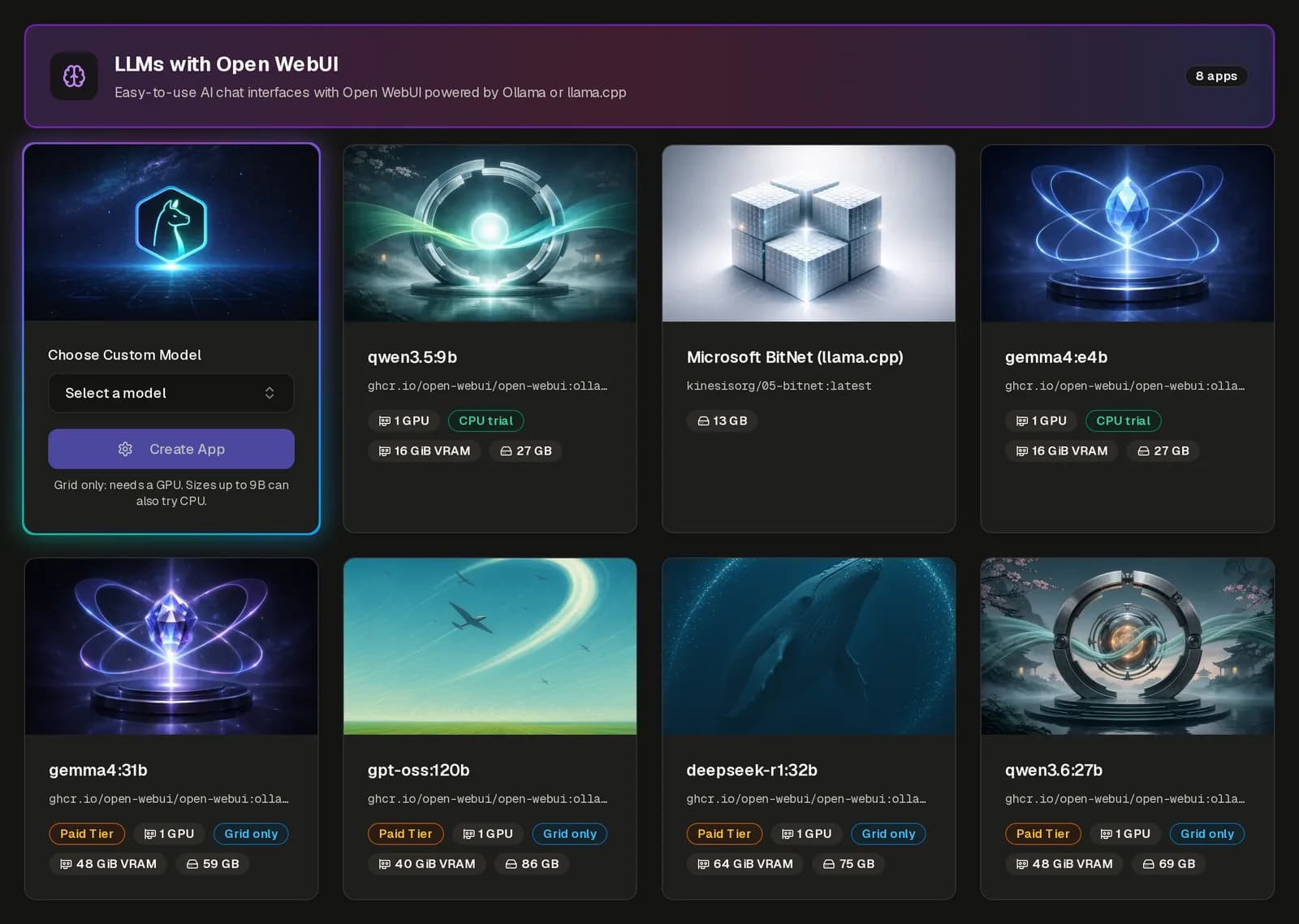
    The Kinesis App Gallery: LLM templates with a model picker, GPU and VRAM badges

    01

    One-Click AI Models, No Account Needed

    Anyone can now browse the Kinesis App Gallery before signing up, and pick the exact Ollama model to run with one click. Teams can see what they can run before they commit to anything. Going from "I want to try this model" to a running endpoint takes minutes, not a weekend of setup.

    BEFOREFinished jobskept restartingRestart: AlwaysRunAgainAgainAgain…restartWasted compute, still billedbilledNOWTask CompletionRuns once, then stopsRunCompletedStopbilledWork done, billing stops

    02

    Run-to-Completion Jobs

    The new "Task Completion" restart policy lets batch jobs, data pipelines and one-off tasks run once and stop cleanly when they finish. Before, a finished job could restart again and again, which wasted compute. Now you pay for the work, and the job stops when the work is done.

    Dedicated GPU machineA typical day, hour by hourSmart LifecycleHibernatedApps running · billedHibernatedSavedSaved00:0006:0012:0018:0024:00Last app stops, machine hibernates

    03

    Auto-Hibernation: Stop Paying for Idle Machines

    Dedicated machines with no running apps now hibernate on their own. Customers no longer pay for GPUs that sit idle overnight or between projects. The machine stays yours, ready to come back when you need it.

    04

    Copy Any App in Seconds

    Export an app's configuration, import it into a new app, or duplicate an existing one with one click. Moving a setup from staging to production, or sharing it with a teammate, no longer means rebuilding it field by field. The exported file even lists every allowed value, so edits are easy and safe.

    05

    Smarter Environment Variables

    Environment variables now support placeholders that Kinesis fills in for you, such as your app's own domain, plus a faster bulk-edit mode. You configure an app once, and it stays correct when its address changes. Fewer manual edits mean fewer broken deploys.

    06

    Production-Grade Load Balancing

    Apps behind the Kinesis load balancer can now serve gRPC over TLS, and web apps keep each visitor on the same instance with sticky sessions. Modern APIs and stateful web apps scale out without code changes. Your users get a fast, consistent experience no matter how many instances you run.

    07

    Image Checks Before You Deploy

    The portal now validates your Docker image before launch and sizes storage from the image itself. Mistakes surface in the form, not as a failed deploy. Fewer surprises, and less time spent reading error logs.